Skip to content
Sleuth

A Finder alternative with a file history

See what arrived on your Mac, and where it came from.

Sleuth lines up every file by the day it landed and the site or app it came from. Search it in plain words, and clear out what you don’t need.

Download free trial Send me the link Buy Sleuth Pro $12₹599

Free to use. Pro free for 3 days, then pay once. First 10 licenses free

  • Native Mac app
  • No account, nothing uploaded
  • 14-day refund
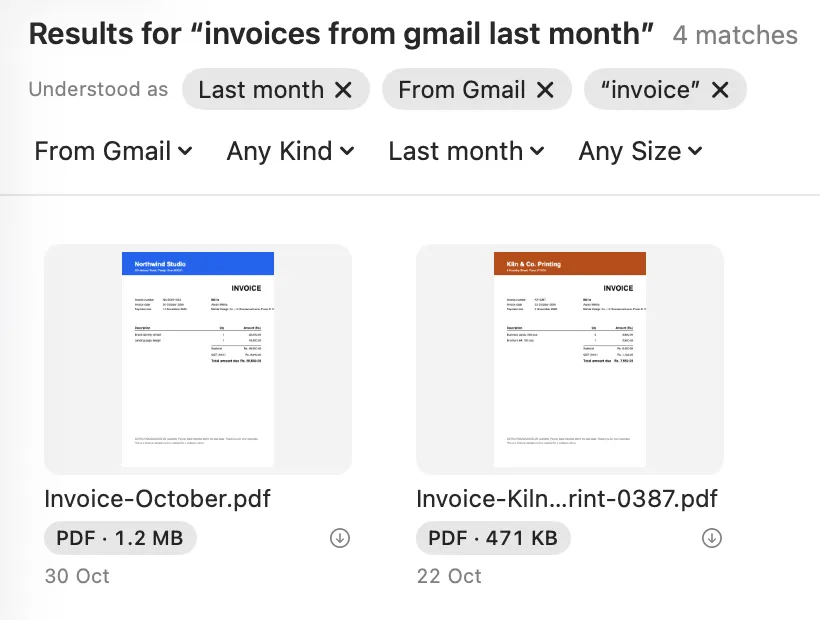
Results for “invoices from gmail last month”, understood as last month, from Gmail and “invoice”, with two of the four invoices.

Sleuth vs Finder

Where Finder stops.

Finder is a fine file browser. Here is what Sleuth adds, and Show in Finder is always one click away.

  • See what arrived today

    Finder: Recents, one long list sorted by date

    Sleuth: Home and a Timeline grouped into days and short sessions, with where each file came from

  • Search in plain words

    Finder: A search field; filters are added by hand

    Sleuth: “pdfs from last week over 5 mb” becomes filters you can see and remove

  • Find text inside screenshots

    Finder: Depends on what Spotlight has indexed

    Sleuth: Reads the text in images and scanned PDFs on your Mac, with Copy Text

  • Know where a download came from

    Finder: Get Info, one file at a time

    Sleuth: Sources groups downloads by site: Gmail, Slack, ChatGPT, AirDrop and more

  • Find duplicates

    Finder: No built-in duplicate finder

    Sleuth: Exact copies and similar photos, with a sensible copy kept

  • Free up space

    Finder: No guided clean-up

    Sleuth: Clean Up cards for old downloads, installers, big old videos and more, all to the Trash

  • Clear developer caches

    Finder: Hidden folders you have to find yourself

    Sleuth: Xcode, Gradle, Android, Node, Flutter and more, with sizes, in one place

  • Undo a clean-up

    Finder: Put Back from the Trash

    Sleuth: Put back a whole clean-up in one click

Finder is a trademark of Apple Inc. Sleuth is not affiliated with Apple.

Timeline

What arrived today.

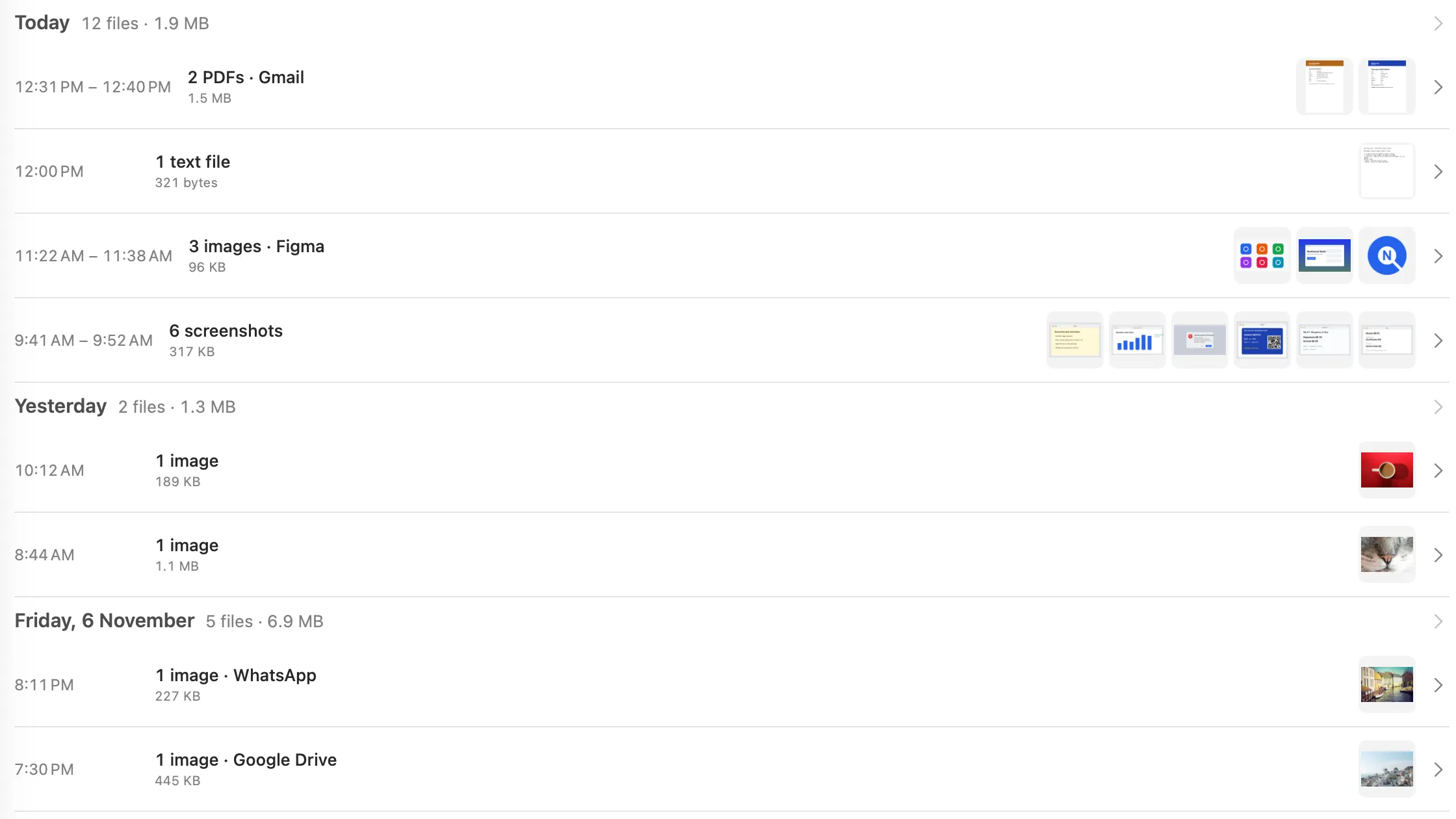
Every file that lands on your Mac takes its place on the Timeline, grouped into days and short sessions like “6 screenshots” or “3 images · Figma”. Day recap answers “what was I doing on Tuesday?”

Day recap Command D

One day in Sleuth's Timeline, grouped into short sessions.

Sources

Where it came from.

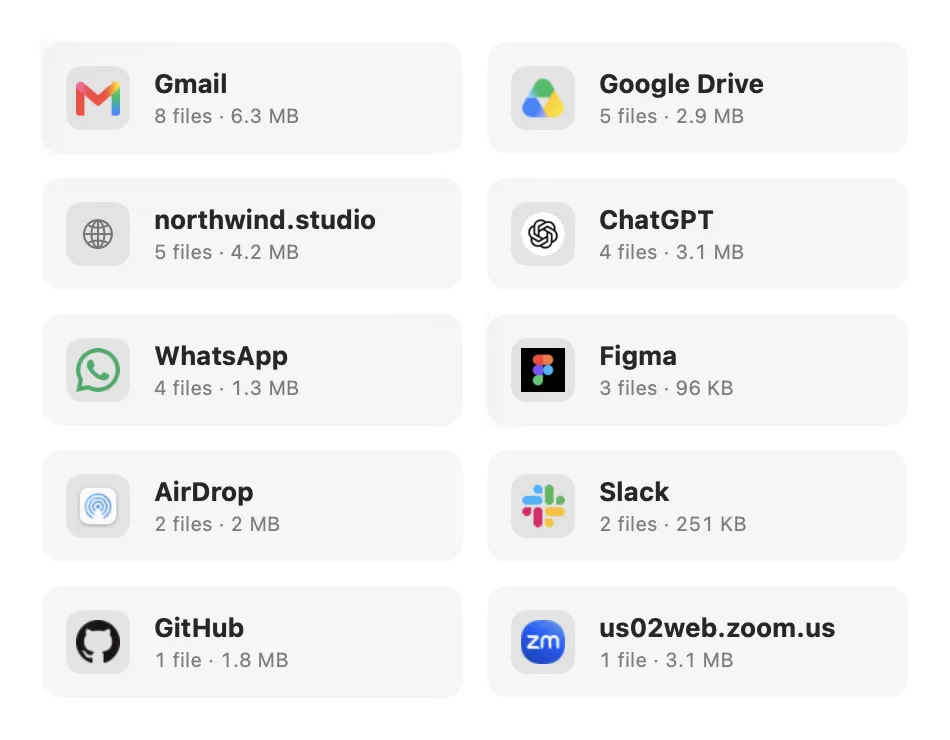
Every download remembers the site or app it came from: Gmail, ChatGPT, Figma, WhatsApp, GitHub, Zoom, AirDrop. The file a client sent last week is one click away, not one scroll through Downloads.

Open Sources Shift Command J

Sources: downloads grouped by where they came from, such as Gmail, ChatGPT, Figma, GitHub and Zoom.

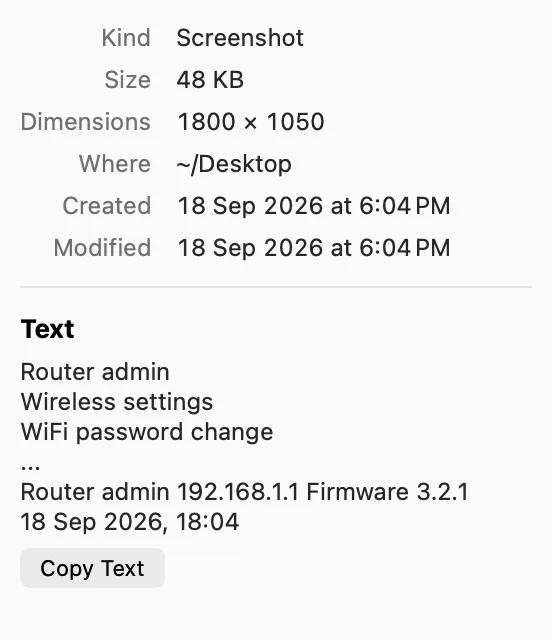
The Info panel shows it for every single file, too.

Clean Up

Get space back.

Forgotten downloads, old installers, copies and caches: Sleuth finds them, sizes each pile and shows you what’s inside. Nothing moves until you say so.

Open Clean Up Shift Command K

From the sample Mac in these screenshots

Free up 15.14 GB

  • Forgotten Downloads 18 items · 15.14 GB
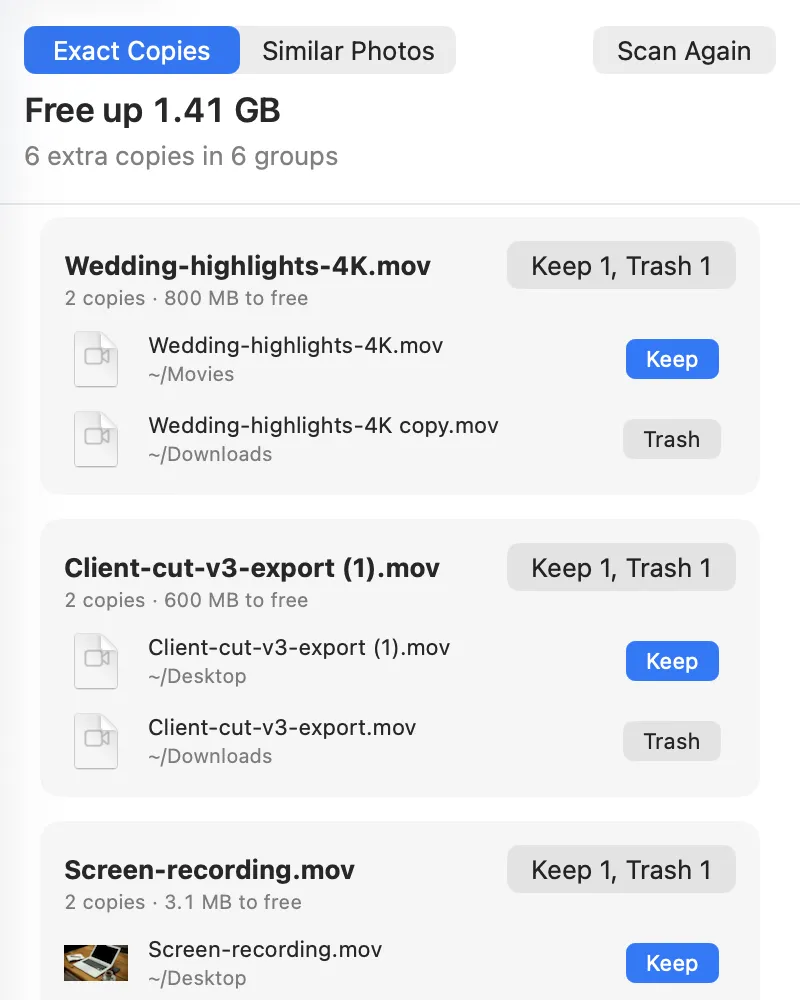
  • Duplicates & Look-alikes 6 items · 1.41 GB
  • Old Installers 4 items · 3.5 MB
  • Old Screenshots 6 items · 295 KB

A file counts once in the total, even when it sits in two piles.

Nothing moves until you say so.

  • Every pile shows its size, its count and a preview before anything moves.
  • Trash files one at a time, or a whole pile at once.
  • Changed your mind? Put back returns the whole clean-up.
  • Shift Command D

    Duplicates, found by what’s inside

    Exact copies, and look-alike photos too: bursts, edits, resized copies. Sleuth picks the copy to keep, you can overrule it, and iCloud-only files are left alone.

    Duplicates: 1.41 GB of exact copies, one copy kept and one marked for the Trash in each group.
  • Shift Command E

    Developer caches, sized

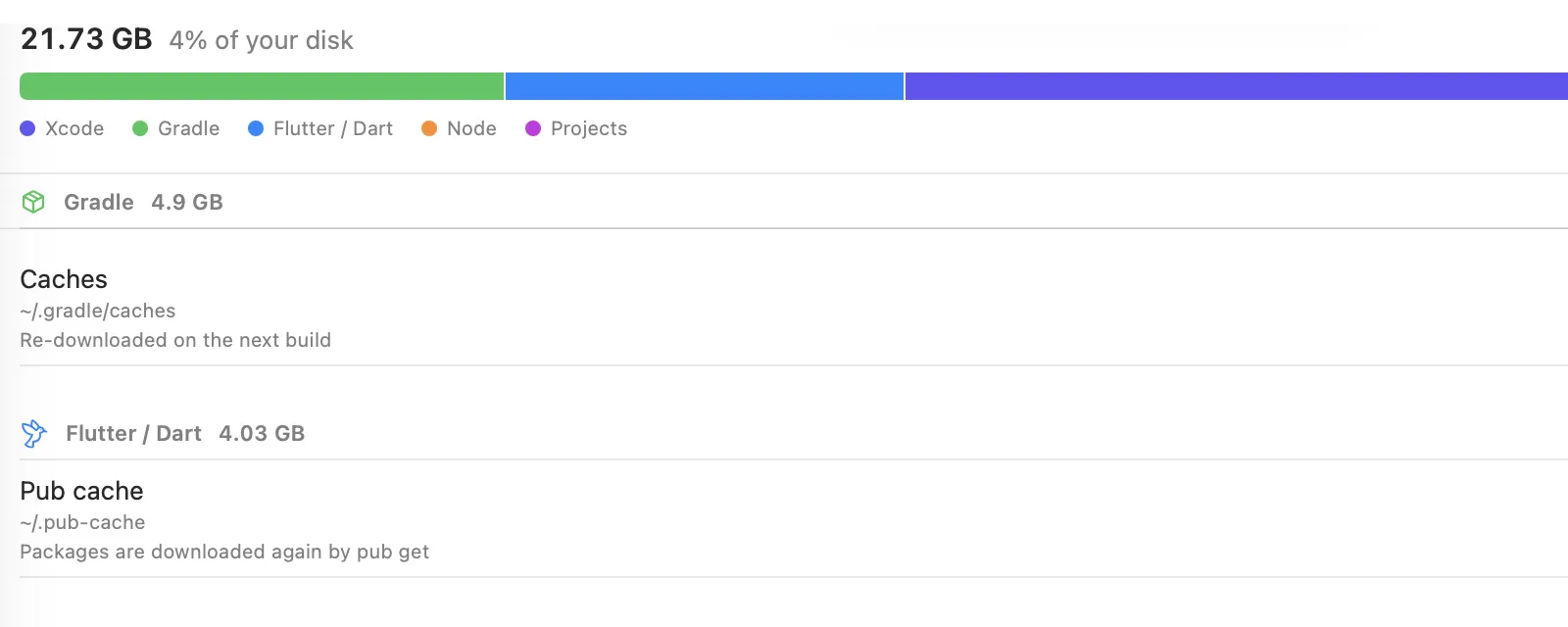
    Xcode, Gradle, Android, Flutter, CocoaPods and Node caches in one list, each with what it is before you clear it.

    Developer: 21.73 GB of Xcode, Gradle, Flutter and npm caches, each with what it is.
  • Shift Command U

    What fills your disk

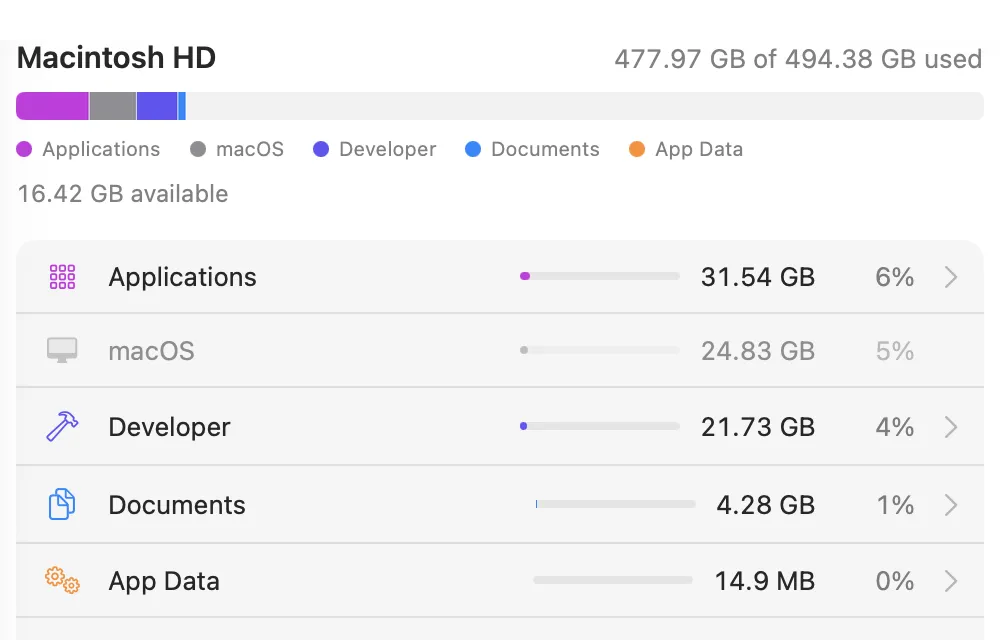
    Storage breaks it down by category, all the way to the file.

    Storage: what fills the disk, by category.

Everything else

Small things, done right.

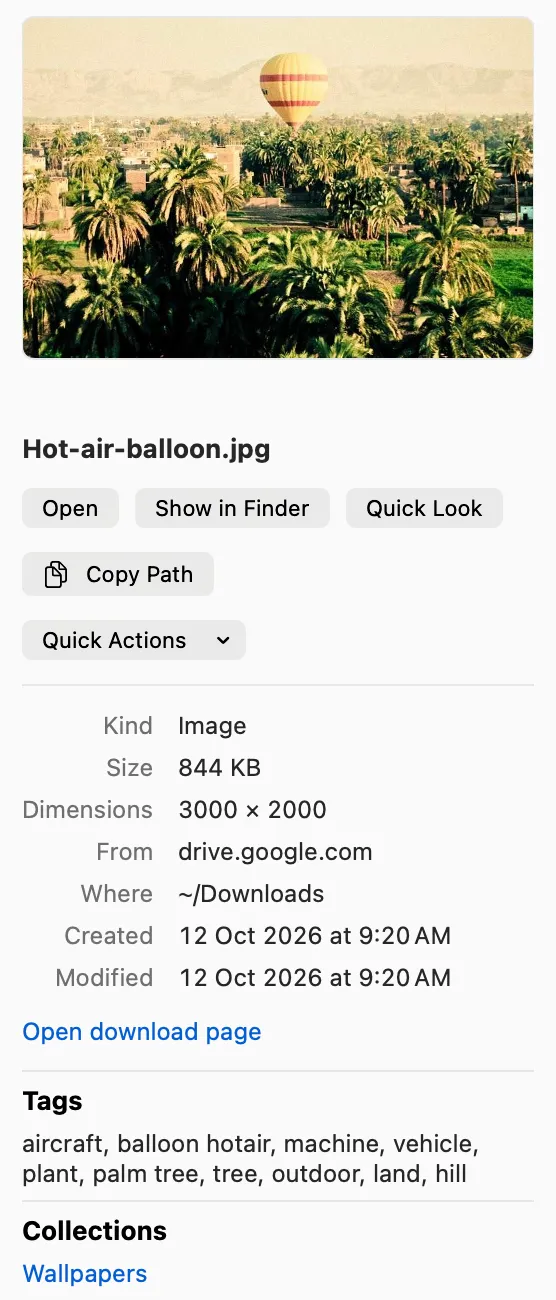
The Info panel with preview, details and Copy Path.

The Info panel

Preview, size, dimensions, camera, where it came from, and Copy Path.

  • Quick Look

    Space

    Preview anything, then step through with the arrow keys.

  • Grid and list

    Command 1 or Command 2

    Big thumbnails or a tidy list, with folder sizes in both.

  • Music player

    Option Space

    Play songs right in the window, track after track.

  • Drag and drop

    Drag one file or many into any app.

  • Right-click everything

    Open With, Copy Path, Quick Actions, Rename and more.

  • Quick actions

    Convert, resize and compress pictures, and remove location data.

  • PDF tools

    Merge, split and compress PDFs, and turn pictures into PDFs and back.

  • Video and audio

    Convert to MP4 or MOV, compress, and pull out the sound.

8 more small things
  • Batch rename

    Rename many files at once with a live preview.

  • Smart collections

    Invoices and receipts, IDs and travel, wallpapers, installers and more, gathered for you.

  • Automatic clean up

    Off until you want it: old installers to the Trash, screenshots filed by month.

  • Menu bar

    Your latest downloads, one click away.

  • Shortcuts actions

    Find Files, Get Latest Download, Get Files From Day and Convert Image.

  • Default file browser

    Optional: “Show in Finder” in other apps opens Sleuth.

  • Hidden files

    Shift Command Period

    Show them when you need them, hide them when you don’t.

  • Automatic updates

    Signed updates download in the background and install when you quit.

Show all shortcuts

Made for the keyboard

Find

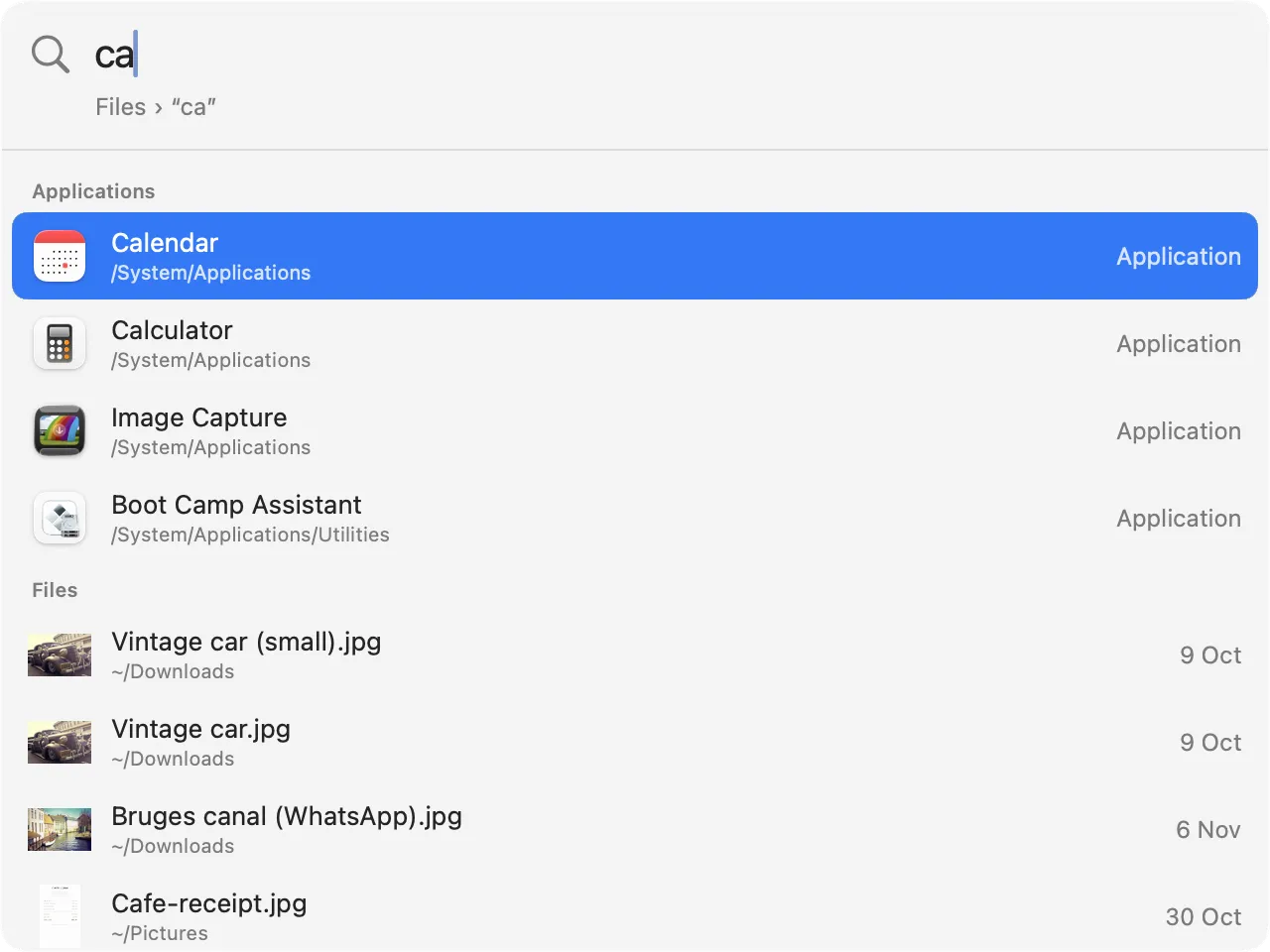
Quick Search, from any app
Shift Command Space
Search everywhere
Command K
Search
Command F
Save search
Command S
Copy text
Shift Command C
Copy path
Option Command C
Day recap
Command D

View

Grid or list
Command 1 or Command 2
Bigger or smaller cards
Command Equals or Command Minus
Inspector
Command I
Quick Look
Space
Show hidden files
Shift Command Period
Toggle sidebar
Control Command S
Back or forward
Command Left Bracket or Command Right Bracket

Tidy

Clean Up
Shift Command K
Duplicates
Shift Command D
Sources
Shift Command J
Storage
Shift Command U
Developer
Shift Command E
Move to Trash
Command Delete
Play or pause
Option Space

Privacy and specs

Your files stay on your Mac.

No account, no analytics, no uploads. Here is what runs where, and the few things Sleuth sends over the network.

Requires
macOS 14 Sonoma or later
Runs on
Apple silicon and Intel
Built with
Native SwiftUI and AppKit
Text recognition
Apple’s Vision framework, on your Mac
Duplicates
SHA-256 for exact copies; Vision feature prints for similar photos
Your files
Never uploaded. iCloud-only files are never downloaded.
Removing files
Files you remove go to the Trash and can be put back. Developer clean-up runs a tool’s own clean command after you confirm; those caches can’t be put back.
Network
License checks with Dodo Payments, update checks, and website icons for Sources and Quick Search (you can turn icons off)
Account
None
License
One-time purchase, for 1, 3 or 5 Macs

Pricing

Buy once. Updates included.

One-time $12₹599 for 1 Mac. No subscription. Sleuth is free to use, and every Pro feature is free for 3 days first.

The first 10 licenses are free.10 of 10 left

Choose 1 Mac, then type FIRST10 in the discount field at checkout. The price drops to $0₹0, and your license key arrives by email like any other. One per person.

Price for 1 Mac, by launch stage

  1. Launch Now

    Launch price · first 100 licenses

    $12 ₹599

  2. Early

    Next 400 licenses

    $19 ₹799

  3. Regular

    After that

    $24 ₹999

Share Sleuth, get it free. When your post about Sleuth reaches 2,000 views, we refund your license and you keep it. How it works

Sleuth Pro

How many Macs

$12$18$24₹599₹899₹1,199

One-time · 1 Mac3 Macs5 Macs · Launch price

  • Every Pro feature, on 1, 3 or 5 Macs
  • Your key by email; activate in one click
  • Move it anytime with Deactivate this Mac
  • Free updates
  • 14-day refund, no questions asked

Everything for 3 days. Plenty free forever.

The trial unlocks every feature. Afterwards, Sleuth stays useful for free, and Pro unlocks the power tools.

Free forever

  • Browsing, folders, grid and list, Inspector and Quick Look
  • Home and the Timeline
  • Search by name, kind, date, size and source
  • Storage, Developer and Sources views
  • See what Clean Up and Duplicates could free
  • Move to Trash and rename, one item at a time
  • Put back and Undo, always

Sleuth Pro

  • Quick Search from any app
  • Search inside files, including text in images
  • Copy Text
  • Photo search by what photos show
  • Apple Intelligence search, on macOS 26
  • Smart collections
  • Clean up in one go: Trash All and Trash Selected
  • Developer clean commands and automatic clean up
  • PDF tools, video and audio conversion
  • Batch conversions and renaming

Put back and Undo are never locked.

FAQ

Before you buy.

Another question?
support@getsleuth.app

Does Sleuth replace Finder?

It can be the app you browse files in every day. Finder keeps running, because macOS uses it for the desktop and the Trash. If you like, turn on Settings ▸ General ▸ “Make Sleuth the default file browser”, and “Show in Finder” in most other apps opens Sleuth instead. It is off until you turn it on.

Does Sleuth upload my files?

No. Sleuth indexes and searches your files on your Mac, and reads text in images with Apple’s on-device Vision framework. There is no account and no cloud. Files that live only in iCloud are never downloaded.

Will Sleuth delete my files?

Files you remove in Sleuth go to the Trash, and Undo or Put back brings them back, even a whole clean-up at once. Nothing moves until you choose. The one exception is Developer clean-up: it runs each tool’s own clean command (like “brew cleanup”) only after you confirm, and those tools delete their caches themselves.

Why does Sleuth ask for folder access?

macOS asks you before any app can read your Desktop, Documents or Downloads. You pick the folders. Full Disk Access is optional; it lets Sleuth see your whole Mac, such as Mail and other users, in Storage.

What happens after the trial?

The 3-day trial unlocks everything. After it, Sleuth keeps working for free, and the Pro features show a small lock until you buy. Pricing lists what is in each.

How do the first 10 free licenses work?

Buy a license for 1 Mac and type FIRST10 in the discount field at checkout: the price drops to zero, and your license key arrives by email like any other. The code works 10 times in total, once per person. When the counter in Pricing reaches zero, the offer is over.

Is it a subscription?

No. You pay once and keep it.

Can I use it on more than one Mac?

Yes. Choose a 3-Mac or 5-Mac license when you buy. Each Mac you activate uses one seat.

Can I move it to another Mac?

Yes. On the old Mac, choose Settings ▸ License ▸ Deactivate this Mac, then activate the key on the new one.

Does it work offline?

Yes. Sleuth checks your license at launch about once a week. If you are offline, nothing turns off, and it simply checks again later.

How do updates work?

Sleuth checks for updates once a day, downloads them in the background and installs them when you quit. Updates are signed, and you can turn either step off in Settings ▸ Updates.

Can I get a refund?

Yes. If Sleuth isn’t right for you, email us within 14 days of buying and we refund you in full, no questions asked.

How do I get help?

Email support@getsleuth.app.

Know what’s on your Mac, and how it got there.

Free to use · Pro free for 3 days · 14-day refund · No account